Pancok - Powerpoint Template Evaluation
In the landscape of professional presentation design, selecting the right visual framework is a critical step that influences how information is received. The Pancok - Powerpoint Template has emerged as a comprehensive option for users seeking a balance between aesthetic flexibility and structural depth. This article provides an objective analysis of the template's features, intended use cases, and practical considerations to help potential users determine if it aligns with their specific business or personal goals.
Understanding the Pancok Framework
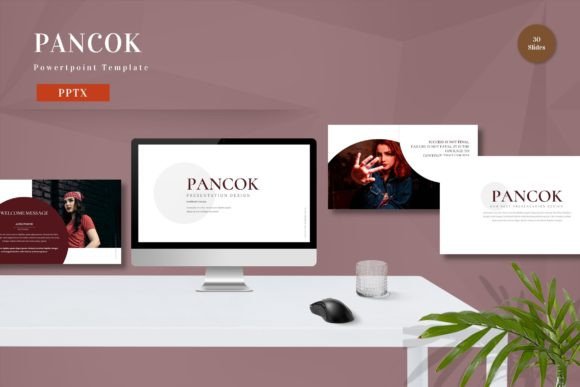
The Pancok - Powerpoint Template is a digital asset designed for Microsoft PowerPoint, structured to accommodate a wide range of presentation needs. Unlike basic templates that offer a single layout, Pancok is built on a vector-based master slide system. This architectural choice ensures that all graphical elements remain crisp at any resolution, a crucial factor for widescreen displays and high-definition projectors. The package includes 150 total slides, providing a robust library of layouts for titles, content, comparisons, timelines, and data visualization.
A defining characteristic of this template is its modularity. Every element within the slides is editable, allowing users to input custom content, replace placeholder images, and adjust color schemes without breaking the design integrity. The inclusion of animated transitions adds a layer of dynamism to the presentation, though these can be toggled off if a static format is preferred. The template relies on recommended free web fonts, ensuring that typography remains consistent across different devices without requiring the installation of proprietary typefaces.
Key Features and Functional Capabilities
When evaluating presentation tools, the breadth of available resources often dictates efficiency. The Pancok suite offers several distinct functional advantages:
- Extensive Slide Library: With 150 slides in total, including 30 specifically designated as "useful" core slides, users have access to a diverse array of layouts. This reduces the need to create new slides from scratch, saving significant time during the drafting phase.
- Color Flexibility: The template comes with five premade color themes. These are not merely surface-level changes but are integrated into the master slides, meaning a global color switch updates charts, icons, and text boxes simultaneously.
- Drag-and-Drop Simplicity: The interface is designed for ease of use. Users can replace images by simply dragging and dropping files onto placeholders, a feature that streamlines the workflow for non-designers.
- Widescreen Optimization: All five PPTX files included in the package are formatted for widescreen aspect ratios (typically 16:9), which is the current standard for modern monitors and conference room projectors.
Benefits for Business and Personal Use
The primary benefit of utilizing the Pancok - Powerpoint Template is the reduction of cognitive load associated with design. By providing a pre-structured environment, the template allows presenters to focus on content quality rather than alignment and spacing issues. For business professionals, this means faster turnaround times for pitch decks, quarterly reports, and training materials.
For personal projects, such as academic presentations or wedding slideshows, the template offers a polished look that might otherwise require hiring a graphic designer. The ability to customize colors and images ensures that the final output feels unique to the presenter, avoiding the generic "stock template" appearance that can undermine credibility. Furthermore, the inclusion of a Readme file provides guidance on how to navigate the complex structure of 150 slides, making the learning curve manageable even for those with intermediate PowerPoint skills.
Tradeoffs and Considerations
While the volume of slides is a strength, it also presents a potential tradeoff. A library of 150 slides can be overwhelming for users who only need a simple three-slide introduction. Navigating through extensive slide masters to find the perfect layout may take longer initially than using a minimalist template with fewer options. Users must be prepared to invest time in exploring the file structure before they can leverage its full potential.
Additionally, while the template supports animation, over-reliance on these effects can distract from the core message. Presenters should evaluate whether the animated transitions align with their communication style. In formal settings where brevity and clarity are paramount, excessive motion graphics might be counterproductive. It is also important to note that preview images are not included in the download; users must source their own imagery to populate the placeholders effectively.
Ideal Scenarios for Implementation
The Pancok - Powerpoint Template is particularly well-suited for situations requiring versatility and scalability. It is an excellent fit for:
- Corporate Reporting: Companies needing a consistent brand identity across multiple departments can utilize the five premade colors to create variations of the same deck for different teams.
- Complex Data Presentation: The variety of chart and graph layouts makes it ideal for financial reviews or analytical reports where data visualization is key.
- Consulting Firms: Consultants who frequently create pitch decks for various clients can adapt the template quickly to match client branding without starting from zero.
- Academic Conferences: Researchers can utilize the clean, vector-based layouts to present findings clearly without distracting backgrounds.
When Alternatives May Be Preferable
Despite its robust feature set, there are scenarios where the Pancok template may not be the optimal choice. If a user requires a highly specialized industry theme—such as medical imaging or heavy industrial construction—the general business aesthetic of Pancok might feel too broad. In such cases, niche-specific templates could provide more relevant iconography and context.
Furthermore, for users who prefer a completely blank canvas to exercise full creative control, a template with 150 pre-designed slides might feel restrictive. Minimalist designers who favor stark, typographic-heavy designs might find the decorative elements of Pancok unnecessary. Finally, if the presentation will be viewed on older hardware or software versions, the advanced animations and widescreen formatting might not render correctly, suggesting a simpler, legacy-compatible alternative would be safer.
Decision-Making Insights
To determine if the Pancok - Powerpoint Template is the right investment, consider the following questions:
- Do you need variety? If your presentations vary significantly in length and content type, the 150-slide library offers long-term value.
- Is speed a priority? If you need to assemble a deck quickly with minimal design effort, the drag-and-drop functionality and premade layouts will accelerate your workflow.
- Are you comfortable with customization? While the template is editable, achieving a truly bespoke look requires some familiarity with PowerPoint's master slide editing tools.
- Does your audience expect professionalism? The clean, vector-based design ensures a high-quality visual output that meets corporate standards.
Ultimately, the decision to adopt this template depends on balancing the need for design consistency with the desire for creative freedom. For most business and personal users seeking a reliable, versatile foundation for their presentations, Pancok offers a pragmatic solution that bridges the gap between amateur design and professional polish. By understanding its capabilities and limitations, users can make an informed choice that enhances their communication effectiveness.