Olecans - Powerpoint Template Overview
In the world of digital communication, the quality of your visual presentation often speaks louder than the words you choose. Whether you are pitching a startup idea to investors or explaining a complex concept to a classroom, the container for your message matters just as much as the message itself. This is where the Olecans - Powerpoint Template comes into play. It is not merely a collection of slides; it is a structured design system built to help you communicate with clarity, style, and professionalism without needing advanced graphic design skills.
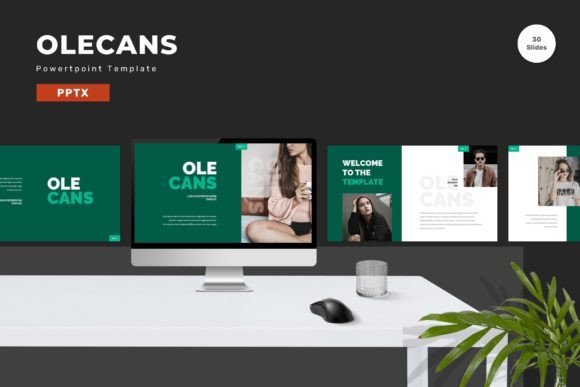
The Olecans template stands out because it bridges the gap between rigid corporate standards and creative freedom. With 150 total slides available across five premade color schemes, it offers a breadth of options that allows users to adapt a single framework to vastly different contexts. But what makes this tool truly valuable is its flexibility. Every element is editable, meaning you can input your content, swap placeholder images with your own high-resolution photos, and adjust colors to match your brand identity seamlessly.
Why Design Matters for Different Audiences
The need for a robust presentation tool varies significantly depending on who is using it. For a seasoned marketing professional, the priority might be brand consistency and speed. For a student or educator, the focus could be on clarity and engagement. The Olecans - Powerpoint Template addresses these diverse needs by providing a versatile foundation that adapts to the user's specific goals.
Professionals and Entrepreneurs often face high-stakes environments where a slide deck can determine the success of a deal. In these scenarios, reliability and polish are non-negotiable. A messy or inconsistent slide deck can undermine credibility before the first word is spoken. Olecans solves this by offering vector-based master slides that ensure crisp graphics at any size. The inclusion of animated slides adds a layer of dynamism that keeps stakeholders engaged without distracting from the core data.
Educators and Trainers have a different set of challenges. They need to break down complex information into digestible chunks. The 30 useful slides included in the package provide pre-structured layouts specifically designed for information hierarchy. Whether creating a lecture series or a training manual, the ability to drag and drop elements allows educators to focus on pedagogy rather than fighting with formatting tools.
Creatives and Freelancers value aesthetics and customization. They often reject templates that feel too generic. The five premade colors in Olecans offer a starting point, but the deep editability ensures that no two presentations have to look the same. By replacing standard placeholders with custom imagery and tweaking the palette, freelancers can maintain their unique artistic voice while leveraging the efficiency of a pre-built structure.
Tailoring the Tool to Your Skill Level
One of the most significant advantages of the Olecans - Powerpoint Template is its accessibility. It is designed to serve both beginners who are new to PowerPoint and experienced users looking to streamline their workflow.
For beginners, the learning curve of creating a presentation from scratch can be daunting. Deciding on font pairings, aligning text boxes, and ensuring color harmony takes time and design knowledge. Olecans removes these barriers. The recommended free web fonts are already integrated, ensuring typography looks professional instantly. The "Readme First" guide included in the package acts as a roadmap, helping new users navigate the features without frustration. Beginners can simply open the file, type their text, and insert their images, resulting in a polished final product that rivals work done by designers.
Experienced users, on the other hand, appreciate the underlying architecture. Because the template is based on Master Slides, power users can make global changes efficiently. If a client decides they want to change the primary brand color from blue to green, an expert can update the master slide once, and the change propagates through all 150 slides automatically. This saves hours of manual editing. Furthermore, the widescreen format (16:9) is native to modern displays, eliminating the need to resize or reformat content for projectors and large monitors.
Practical Applications Across Industries
The versatility of the Olecans template extends across various industries, proving its utility beyond simple business meetings.
- Small Business Owners: You might use the 150-slide library to create everything from investor pitch decks to quarterly financial reports. The variety ensures you don't run out of layout options when presenting different types of data, such as charts, timelines, or team structures.
- Marketers and Bloggers: When repurposing blog content into webinar slides or social media carousels, the clean, vector-based graphics ensure your visuals remain sharp. The animated slides can be particularly effective for storytelling, guiding the audience through a narrative arc step-by-step.
- Hobbyists and Consumers: Even if you aren't a business owner, you may need to present ideas for community events, family reunions, or personal projects. The ease of use means you can create something visually impressive for a personal milestone without spending money on expensive software or hiring a designer.
Evaluating Value: Cost, Quality, and Flexibility
When deciding whether a template like Olecans fits your needs, it is important to weigh several factors. Cost is often the first consideration. While there are many free templates available online, they frequently lack the depth and customization options found in premium offerings. Free templates often have locked elements, poor resolution, or limited color schemes. In contrast, the Olecans package includes five PPTX files, giving you multiple variations to choose from immediately.
Quality is another critical metric. The use of vector-based graphics means that your images will never pixelate, regardless of how much you zoom in or how large the screen is. This level of technical quality is essential for maintaining a professional image. Additionally, the inclusion of recommended free web fonts ensures that your presentation will render correctly on any computer, avoiding the common issue of missing fonts breaking your layout.
Flexibility determines long-term usefulness. A template that locks you into one style is only good for one project. Olecans, with its fully editable nature, becomes a reusable asset. You can save sections of the deck as building blocks for future presentations. Over time, the initial investment in the template pays off as you reduce the time spent on design tasks for every subsequent project.
Getting Started with Olecans
Integrating the Olecans - Powerpoint Template into your workflow is straightforward. Upon download, you will receive five distinct PPTX files corresponding to the five premade color themes. Each file contains the full suite of 150 slides. The process begins with opening the "Readme Information" file, which provides instructions on how to customize the master slides and access the hidden layers.
To get the most out of the template, start by selecting the color scheme that best aligns with your current project. Then, utilize the drag-and-drop functionality to populate the slides with your content. Remember that the placeholder images are just examples; replacing them with your own photography or branding assets is key to making the presentation feel authentic. Don't hesitate to experiment with the animated slides to add movement to your data visualization or transitions.
Ultimately, the goal of using a tool like Olecans is to shift your focus from "how do I make this look good?" to "what story am I telling?" By handling the heavy lifting of design, the template empowers you to concentrate on your content, your strategy, and your audience. Whether you are a beginner taking your first steps into professional presenting or an entrepreneur scaling your business communications, having a reliable, high-quality visual foundation can make all the difference.
If you are ready to elevate your presentations with a tool that balances aesthetic appeal with practical functionality, exploring the Olecans - Powerpoint Template is a logical next step. Its comprehensive feature set, combined with its ease of use, makes it a valuable resource for anyone who needs to present ideas clearly and confidently.