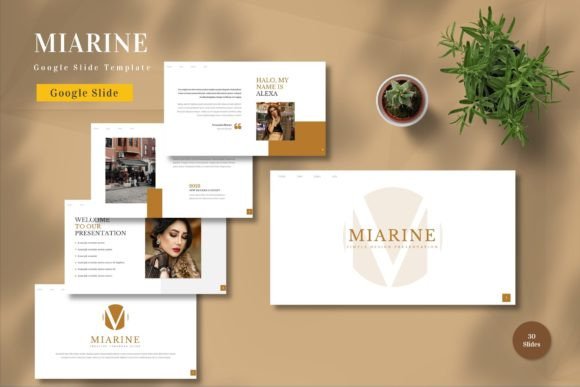
Miarine Google Slide Template Overview
In the world of digital presentations, the gap between a good idea and a compelling story is often just a matter of design. For many professionals, students, and creatives, the blank canvas of a new presentation can be paralyzing. This is where Miarine - Google Slide Template steps in as a practical solution. It is not merely a collection of slides; it is a structured framework designed to streamline the creation process while ensuring a polished, professional aesthetic. Whether you are pitching a startup to investors or explaining complex concepts to a classroom, having a reliable visual foundation allows you to focus on what truly matters: your content.
The template is built for versatility and ease of use. With 150 total slides available across five premade color schemes, it offers a breadth of options that cater to various branding needs without requiring advanced graphic design skills. Every element within the Miarine structure is editable. You can input your own text, swap out placeholder images with your specific visuals, and adjust color palettes to match your organization's identity. Furthermore, the inclusion of animated slides adds a dynamic layer to your storytelling, keeping audiences engaged without the need for complex manual animations.
Why Design Matters for Different Audiences
The value of a presentation tool like Miarine varies significantly depending on who is using it. For a beginner, the primary hurdle is often technical confidence. They may fear that their slides will look amateurish if they attempt to build them from scratch. For this group, Miarine provides a safety net. The vector-based master slides ensure that even simple edits result in a cohesive, high-quality output. The "drag and drop" functionality lowers the barrier to entry, allowing novices to produce work that rivals professionally designed decks.
For experienced users and professionals, time is the most valuable currency. A marketer preparing a quarterly report or a consultant delivering a strategy session does not have hours to spend tweaking alignment or selecting fonts. These users prioritize speed and reliability. The fact that Miarine comes with recommended free web fonts and pre-set layouts means they can bypass the tedious setup phase entirely. They can dive straight into data visualization and narrative construction, knowing the underlying structure is solid and responsive.
Tailored Use Cases for Entrepreneurs and Educators
Entrepreneurs and small business owners often face the unique challenge of needing to present a wide variety of topics, from financial projections to product roadmaps. The 30 useful slides included in the Miarine package cover these essential scenarios. An entrepreneur might use the timeline slides to map out a launch schedule, while utilizing the comparison charts to highlight their competitive advantage. The ability to switch between the five premade colors is particularly useful here; a startup might want a bold, energetic palette for a pitch deck but a more subdued, trustworthy scheme for an internal board meeting. This flexibility ensures the brand voice remains consistent yet adaptable.
Educators and trainers have different priorities, focusing heavily on clarity and engagement. In a learning environment, information overload is a common pitfall. The clean, organized layout of Miarine helps break down complex subjects into digestible chunks. The animated slides can serve as effective transitions between topics, signaling a shift in focus and re-engaging students who might otherwise lose attention. For a teacher creating a curriculum overview or a corporate trainer developing a workshop, the template acts as a scaffold that supports clear communication rather than distracting from it.
Evaluating Quality and Flexibility
When deciding if Miarine is the right fit, potential users should consider their long-term goals and technical comfort levels. One of the strongest selling points of this template is its compatibility with Google Slides. Unlike some proprietary formats that require expensive software licenses, this tool works seamlessly within the cloud-based ecosystem that millions already use daily. This accessibility makes it an excellent choice for remote teams and freelancers who rely on collaborative tools.
Quality is another critical factor. The template is vector-based, which means that graphics remain crisp and sharp regardless of how much they are scaled. This is essential for widescreen presentations, ensuring that logos, icons, and charts do not appear pixelated on large projectors or high-resolution monitors. The inclusion of a "Readme First" file demonstrates a commitment to user support, guiding individuals through the customization process and helping them avoid common pitfalls when editing master slides.
Flexibility extends beyond just changing colors. The structure allows for deep customization. If a user has a specific brand guideline that requires a unique shade of blue, they can easily modify the master slide settings to apply that change globally across all 150 slides. This level of control is often missing in cheaper, rigid templates. It empowers creators to maintain brand integrity while still benefiting from the time-saving aspects of a pre-designed layout.
Practical Steps for Getting Started
Getting started with Miarine is straightforward, designed to minimize friction for users of all skill levels. Upon acquiring the template, you receive five distinct Google Slide files, each representing one of the premade color themes. The first step is to select the color scheme that best aligns with your project's tone. Once selected, the process involves simply replacing the placeholder text and images. Because the elements are editable, you can type directly into the boxes or paste your own content.
For those adding images, the drag-and-drop feature simplifies the workflow. You can upload your photos from your local drive or Google Drive and place them directly onto the slides. The template automatically adjusts the image frames to fit, saving you from manually resizing assets. If you wish to incorporate motion, the animated slides are ready to go, though they can also be disabled if a static presentation is preferred. The entire package is designed to be intuitive, reducing the learning curve associated with complex design software.
Determining if Miarine Fits Your Needs
Is Miarine the right choice for your next project? If you value efficiency, consistency, and a modern aesthetic, the answer is likely yes. It is particularly well-suited for individuals who need to produce multiple presentations over time, such as sales teams, academic departments, or marketing agencies. The investment in a comprehensive template pays off quickly by reducing the time spent on design tasks.
However, it is important to note that preview images are not included in the final download. Users must supply their own imagery, which is standard practice for editable templates but worth remembering if you were expecting stock photos. Additionally, while the template covers a vast array of use cases with its 150 slides, highly specialized industries with unique regulatory or stylistic requirements might need to do some additional customization work.
Ultimately, Miarine - Google Slide Template serves as a bridge between raw ideas and professional execution. It respects the user's time while elevating the quality of their output. Whether you are a freelancer building a portfolio, a student defending a thesis, or a CEO presenting annual results, the template provides a robust, flexible, and visually appealing foundation. By handling the heavy lifting of design, it frees you to concentrate on crafting a message that resonates, persuades, and inspires your audience.