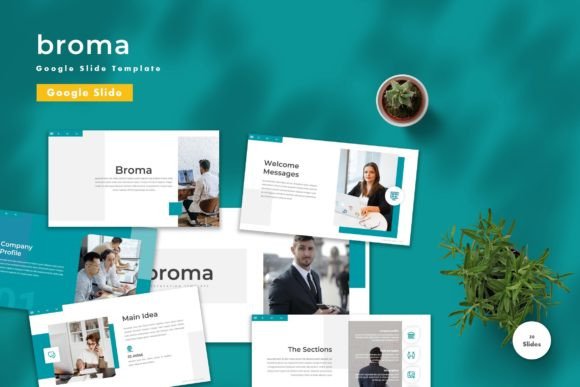
Broma Google Slide Template for Business
Creating a compelling presentation often feels like a balancing act between design aesthetics and clear communication. For many, the blank canvas of a new slide deck is more intimidating than inspiring. This is where Broma - Google Slide Template steps in as a practical solution designed to streamline your workflow without sacrificing creativity. Whether you are pitching to investors, teaching a class, or organizing personal project notes, having a structured foundation can significantly reduce the time spent on formatting and allow you to focus on what truly matters: your message.
This template is not just a collection of pretty slides; it is a comprehensive toolkit built for versatility. With 150 total slides available across five premade color schemes, it offers enough variety to handle different contexts while maintaining a cohesive visual identity. The fact that every element is editable means you are not locked into a rigid structure. You can input your content, replace placeholder images with your own branding, adjust colors to match your style guide, and even utilize the included animated slides to add dynamic movement to your storytelling.
Why Different Audiences Need a Structured Approach
The value of a high-quality presentation tool varies depending on who is using it. A student might prioritize ease of use and visual appeal to grab attention during a seminar, while a seasoned marketing director might look for professional polish and brand consistency. Broma - Google Slide Template addresses these divergent needs by offering a flexible framework that adapts to the user's specific goals rather than forcing a one-size-fits-all approach.
For beginners, the learning curve associated with presentation software can be steep. Trying to master alignment, typography, and color theory simultaneously often leads to frustration and subpar results. This template removes those barriers. By providing vector-based master slides, it ensures that even users with limited design experience can produce output that looks professionally crafted. The "drag and drop" functionality simplifies the process, allowing newcomers to assemble complex decks quickly without needing advanced technical skills.
Conversely, experienced professionals and creators often have different priorities. They may already know how to use Google Slides but lack the time to build a deck from scratch for every project. For them, the efficiency gained from a pre-designed system is invaluable. The inclusion of 30 useful, distinct slide layouts means they can find the right format for data visualization, team introductions, timelines, and financial reports instantly. This saves hours of repetitive work, allowing experts to dedicate their energy to refining their strategy and content rather than tweaking margins.
Tailored Utility for Entrepreneurs and Educators
Small business owners and entrepreneurs frequently need to communicate their vision clearly and persuasively. Whether preparing a pitch deck for potential funding or presenting quarterly results to stakeholders, the visual quality of their slides reflects the professionalism of their venture. Broma - Google Slide Template supports this need by offering a clean, modern aesthetic that builds trust. The ability to switch between five premade colors allows an entrepreneur to align the deck with their company logo instantly, ensuring brand recognition remains consistent throughout the presentation.
Educators face a unique set of challenges. Their presentations must be engaging enough to hold the attention of students while remaining clear enough to convey complex information effectively. The animated slides included in this package can be particularly beneficial here. A well-timed animation can highlight a key concept or reveal information step-by-step, preventing cognitive overload. Furthermore, the recommended free web fonts ensure that text is legible on various screens, which is crucial for hybrid or online learning environments where visibility can vary.
Freelancers and bloggers also benefit from the flexibility of this resource. When pitching services to clients, a freelancer needs to demonstrate reliability and creativity. Using a custom template shows that they care about the details. For bloggers creating video content or digital courses, the widescreen format of the included files ensures compatibility with modern display standards, making the transition from slide deck to video tutorial seamless.
Key Features That Drive Practical Value
When evaluating a presentation tool, several factors come into play: cost, quality, flexibility, and long-term usefulness. Broma - Google Slide Template excels in these areas by offering a robust feature set that enhances productivity.
- Comprehensive Layouts: With 150 total slides, the template covers almost every scenario you might encounter. From title pages to conclusion summaries, the variety ensures you never run out of options.
- Color Versatility: The five premade color themes provide immediate variety. If your project requires a shift in mood—from energetic reds to calm blues—you can apply a new theme without redesigning individual elements.
- Vector-Based Graphics: Unlike raster images that pixelate when resized, vector graphics remain crisp at any scale. This is essential for presentations that might be projected onto large screens or printed as handouts.
- Master Slide Architecture: Built on master slides, the template allows for global changes. If you decide to change the font size or footer information, you can update it once, and it applies to all relevant slides automatically.
- Accessibility: The use of recommended free web fonts means there are no licensing issues or missing font errors when sharing the file with others.
How to Get Started and Maximize Your Results
Getting started with Broma - Google Slide Template is straightforward. The package includes five Google Slide files, each corresponding to a different color scheme, along with a readme file containing essential information. Before diving in, it is helpful to review the readme to understand the structure of the master slides. This small step can prevent confusion later and help you navigate the customization options more efficiently.
Once you have selected your preferred color file, the process is intuitive. Simply click on a text box to type your content. For images, locate the placeholder icons, right-click, and select the option to replace the image with your own from your device or the web. Because the elements are editable, you can also delete unnecessary sections or rearrange components to fit your narrative flow. The animated slides are pre-configured, but you can adjust the timing or effects if you wish to fine-tune the pacing of your presentation.
It is important to note that preview images are not included in the final download. These are visual aids used to showcase the template's capabilities. However, the actual template files contain all the necessary layers and assets for you to build your unique presentation. This distinction ensures that the file size remains manageable and that you start with a clean slate tailored to your specific content.
Determining if Broma Fits Your Goals
Is this the right tool for your next project? If you value speed, consistency, and a professional look without the overhead of hiring a designer, then Broma - Google Slide Template is likely an excellent fit. It is particularly well-suited for those who need to create multiple presentations over time, as the reusable nature of the master slides provides long-term value.
However, if your project requires highly specialized, non-standard animations or a completely bespoke artistic direction that deviates significantly from standard business layouts, you might find the constraints of a template limiting. For most users, though, the balance between structure and flexibility strikes the perfect chord. It empowers you to present your ideas with confidence, knowing that the visual delivery matches the quality of your insights.
Whether you are a hobbyist documenting a passion project or a corporate executive leading a strategic meeting, the ability to present information clearly is a universal skill. Tools like Broma - Google Slide Template serve as a bridge between raw ideas and polished execution, helping diverse audiences achieve their communication goals with greater ease and impact.