Animated Twitch Overlay Package Red Neon
In the competitive landscape of live streaming, visual consistency is often the difference between a casual viewer and a loyal community member. The Animated Twitch Overlay Package Red Neon offers a distinct aesthetic solution for creators seeking to elevate their broadcast quality without compromising performance or simplicity. This package is not merely a collection of graphics; it is a comprehensive toolkit designed to unify your stream's visual identity through a bold, minimal neon red theme. For professionals, hobbyists, and entrepreneurs alike, establishing a polished on-screen presence is essential for conveying authority and engaging an audience effectively.
Defining the Visual Identity with Minimalist Design
The core philosophy behind the Stream Overlays Animated Package is minimalism. In an era where streams can easily become cluttered with excessive widgets and distracting animations, a clean interface allows the gameplay and the creator to remain the focal point. The neon red color palette provides high contrast against most game backgrounds, ensuring that critical information remains visible without overwhelming the viewer. This specific design choice supports readability and maintains an aesthetically pleasing environment that feels modern and intentional.
For content creators who value efficiency, this approach simplifies decision-making. Instead of spending hours sourcing disparate assets that may clash in style, the Animated Twitch Overlay Package Red Neon provides a cohesive set of elements. This uniformity extends from the webcam borders to the chat boxes and alert systems, creating a seamless visual experience. When every element shares the same design language, the stream appears more professional, which can subconsciously influence how viewers perceive the quality of the content being produced.
Enhancing Viewer Engagement Through Dynamic Alerts
One of the most critical aspects of live streaming is maintaining interaction with the audience. The included Animated Twitch Alerts serve as immediate feedback mechanisms for community actions such as new followers, donations, raids, and subscriptions. Unlike static images, these 5-second .WEBM files introduce motion that naturally draws the eye, ensuring that important milestones are acknowledged instantly.
Consider the practical application during a high-energy gaming session. A subtle animation for a new follower or a more prominent display for a donation can validate the viewer's contribution without interrupting the flow of the game. The package includes alerts for New Cheer, New Donation, New Follower, New Host, New Raid, and New Subscriber. By integrating these dynamic elements, streamers foster a sense of community and appreciation. This responsiveness is vital for retaining viewers, as it makes them feel seen and valued in real-time. The short duration of the alerts ensures they provide impact without becoming a nuisance, striking a balance between celebration and continuity.
Optimizing Stream Transitions and Scene Management
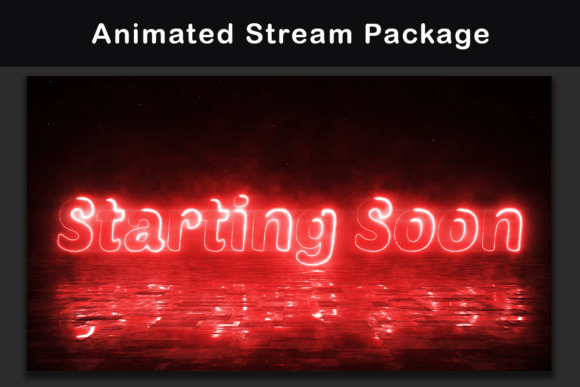
Professional broadcasting requires smooth transitions between different states of the stream, such as moving from gameplay to a break screen or starting a session. The Animated Twitch Overlay Package Red Neon addresses this need with dedicated scenes including Starting Soon, Ending, BRB (Be Right Back), and Offline screens. These are not just placeholders; they are active tools for managing audience expectations.
The "Starting Soon" scene, for instance, builds anticipation before the main event begins, allowing early arrivals to settle in while displaying social links or upcoming schedules. Similarly, the "BRB" screen keeps the channel active during necessary breaks, preventing the stream from looking abandoned. The inclusion of an Animated Stinger for scene transitions adds a layer of polish that distinguishes amateur setups from professional productions. These 10-second long .MP4 intermission screens provide ample time to convey messages or simply offer a visual breather, enhancing the overall rhythm of the broadcast.
Versatile Webcam Integration
Your face is often the primary connection point with your audience, making the presentation of your webcam crucial. This package offers flexibility with both 4:3 and 16:9 animated webcam frames. Whether you use a standard HD camera or a modern ultrawide setup, having the correct aspect ratio ensures your video feed integrates perfectly with the overlay. The neon red borders frame the creator cleanly, adding a stylistic touch that complements the rest of the interface. This attention to detail ensures that even when the focus shifts from the game to the streamer, the visual quality remains consistent and high.
Structuring Information with Customizable Bars and Panels
Beyond the live action, the periphery of your stream serves as a hub for information. The package includes two social bars, two support bars, and nine separate animated elements, along with 36 Twitch panels. These components allow streamers to organize essential data—such as social media handles, donation links, and hardware specifications—in a structured manner.
For small business owners or educators using Twitch to promote other ventures, these panels are invaluable. They provide a permanent space to direct traffic to external platforms, newsletters, or merchandise stores. The animated bars add a dynamic flair to these informational sections, keeping them visually interesting without requiring constant manual updates. By utilizing the 9x separate elements, creators can customize the layout to fit their specific needs, prioritizing the information that matters most to their unique audience.
Technical Considerations and File Formats
Understanding the technical specifications of the Animated Twitch Overlay Package Red Neon is key to implementation. All files are provided in 1920x1080 pixels, the standard resolution for Full HD streaming. The use of .WEBM format for overlays and alerts is significant because it offers transparency and smaller file sizes compared to traditional video formats, reducing the strain on CPU resources. This is particularly beneficial for streamers running games that already demand significant processing power.
It is worth noting that to preview the .WEBM files, users must load them into a streaming program like OBS Studio or drag them into a compatible web browser. This requirement ensures that the animations render correctly within the context of a live broadcast. While the package is robust, users should consider their own internet upload speeds and computer capabilities. High-quality animations require stable bandwidth to prevent lag or pixelation, so testing the overlay in a local environment before going live is recommended.
Who Benefits Most From This Package?
This overlay suite is particularly well-suited for a diverse range of users. Professional gamers and esports commentators will appreciate the sleek, non-intrusive design that keeps the focus on competitive play. Content creators and bloggers looking to expand into live video will find the pre-made scenes and panels save significant production time. Educators hosting live workshops can utilize the "Starting Soon" and "BRB" screens to manage class logistics professionally.
Furthermore, freelancers and entrepreneurs who use Twitch for networking or brand building will benefit from the customizable social bars and support sections. The minimal aesthetic appeals to those who prefer a sophisticated look over chaotic, cartoonish designs. However, creators whose personal brand relies heavily on pastel colors or completely different themes might need to compare options to ensure the neon red fits their existing identity. While the design is versatile, the specific color choice is a defining feature that should align with the creator's broader visual strategy.
Maximizing Efficiency in Content Creation
Ultimately, the value of the Animated Twitch Overlay Package Red Neon lies in its ability to streamline the setup process. By providing a complete ecosystem of assets—from alerts to panels—creators can launch a high-quality stream much faster than if they were designing each element from scratch. This efficiency allows more time to be spent on content creation, community management, and strategic growth. In the fast-paced world of digital media, tools that simplify workflow while enhancing output quality are indispensable. This package represents a practical investment in the visual infrastructure of any serious streaming endeavor.